Unprofitabel? Deshalb.
Das Trading‑Journal, das dir zeigt, wo du Geld verlierst — und wo nicht.
15,99 €/Monat inkl. aller Steuern. 10 Tage kostenlos testen.1
Das sind ≈ 3,99 € pro Woche.
10 Tage kostenlos testenKeine Kreditkarte nötigMonatsabo jederzeit kündbar
Local-first · DSGVO-konform · Keine Werbung · Entwickelt in Deutschland
Demo-Konto. Simulierte Darstellung.2
Wo du Geld verlierst.
Nach Reihenfolge. Nach Emotion. Nach Uhrzeit. Nach Wochentag. LUCRA rechnet jedes Muster in Dollar um — Trade für Trade.
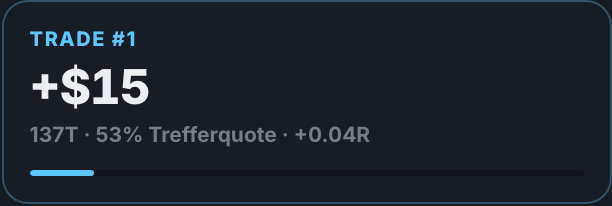
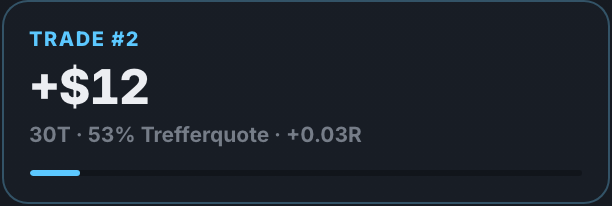
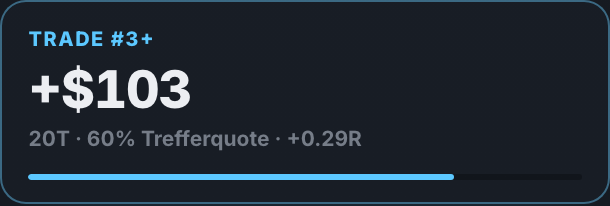
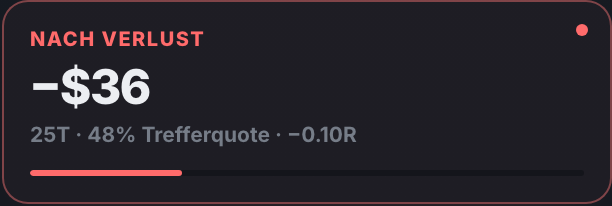
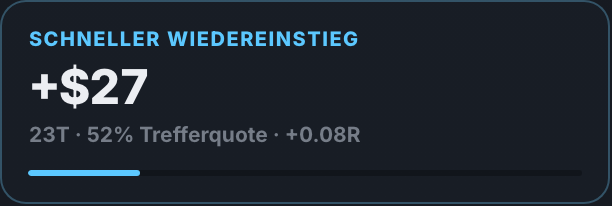
Wo deine Disziplin kippt. Nach einem Verlust bist du ein anderer Trader — LUCRA zeigt dir, was das kostet.




Calm verdient. FOMO bezahlt. Jede Emotion bekommt eine Zahl.
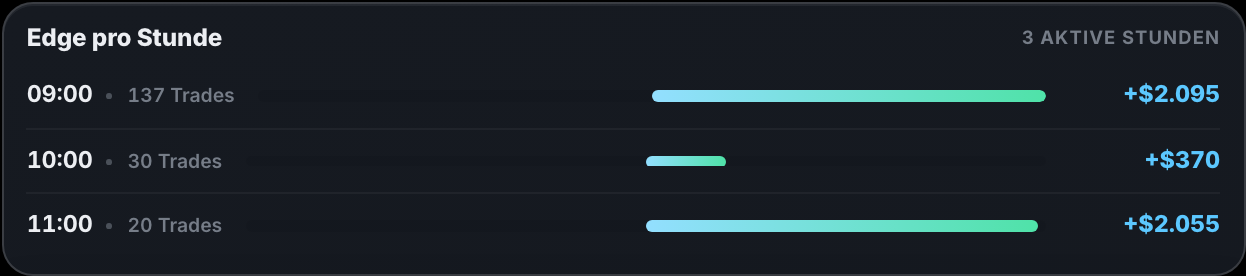
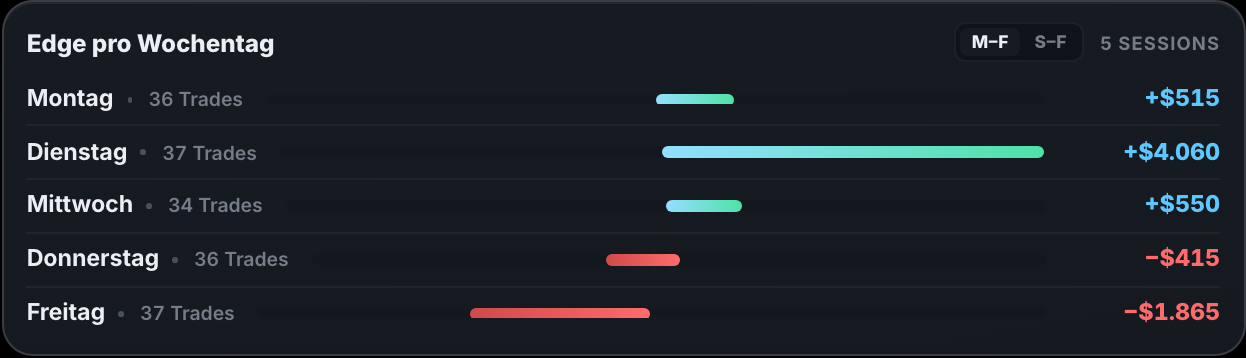
Dein Edge hat eine Uhrzeit. Und einen Wochentag.
Zu früh. Zu spät. Zu teuer.
Confirmed, Early, Late oder Forced: LUCRA rechnet dir vor, was jedes Einstiegsmuster bringt — oder kostet.




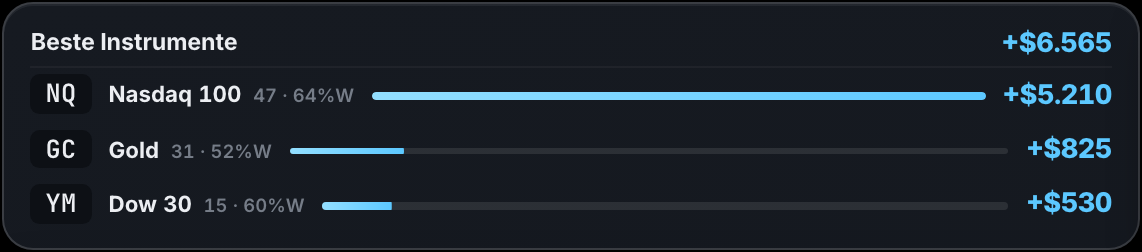
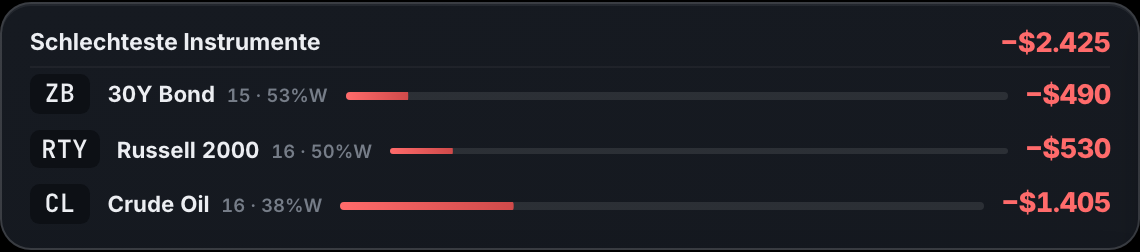
Dein bestes Instrument. Dein teuerstes.
Top und Flop nach P&L — nebeneinander. Mehr von dem handeln, was dich trägt. Weniger von dem, was dich kostet.
Das Journal. Jeder Tag eine Karte.
Tages-P&L, Trades und Trefferquote auf der Karte — dahinter fünf Chart-Slots von M1 bis H4 und deine Session-Notizen. Zu jedem Trade: Strategie, Emotion, Einstiegsqualität. Screenshots landen per ⌘V im Tag.
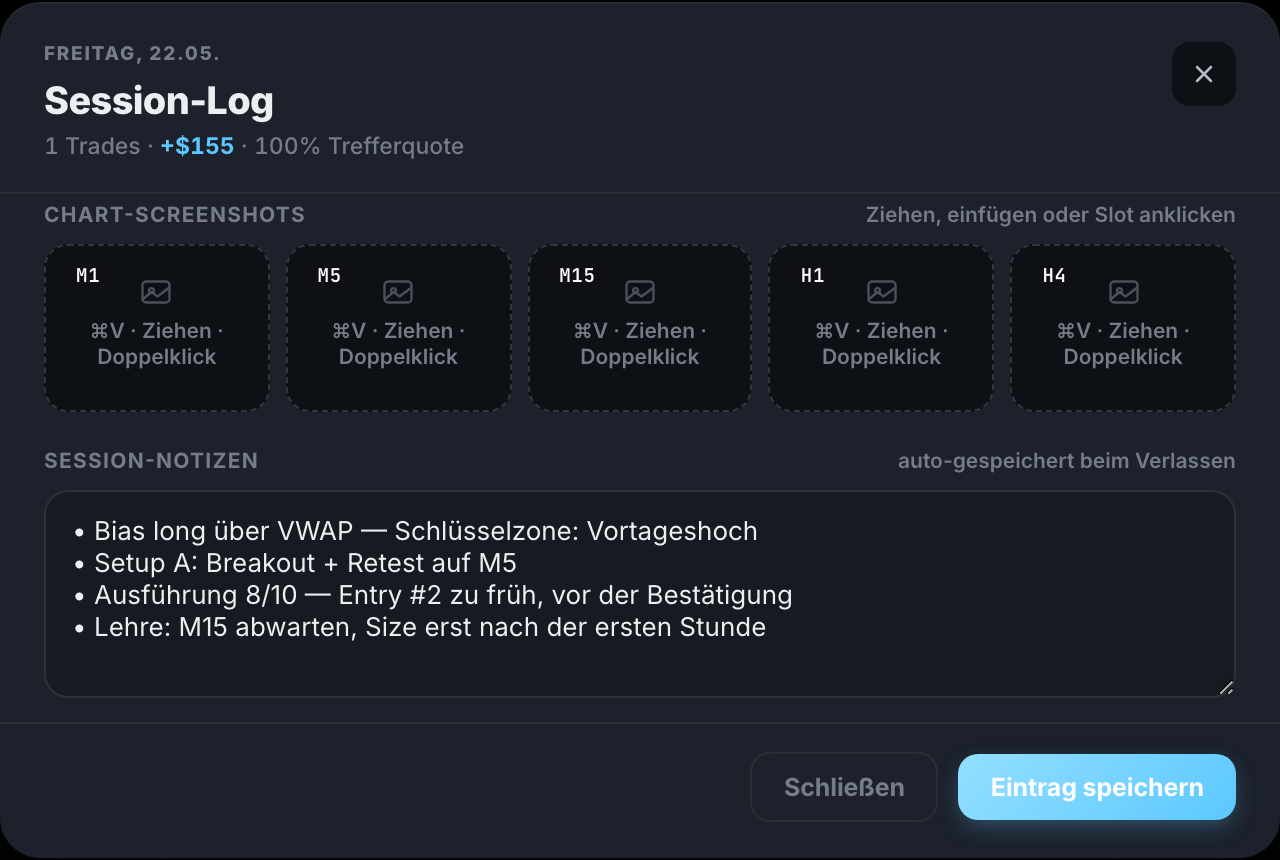
Fünf Chart-Slots. Frei benennbar — M1, M15, H4 oder was zu deinem Tag passt. Einfügen, ziehen, fertig.
Session-Notizen. Bias, Setup, Lehre des Tages — automatisch gespeichert.
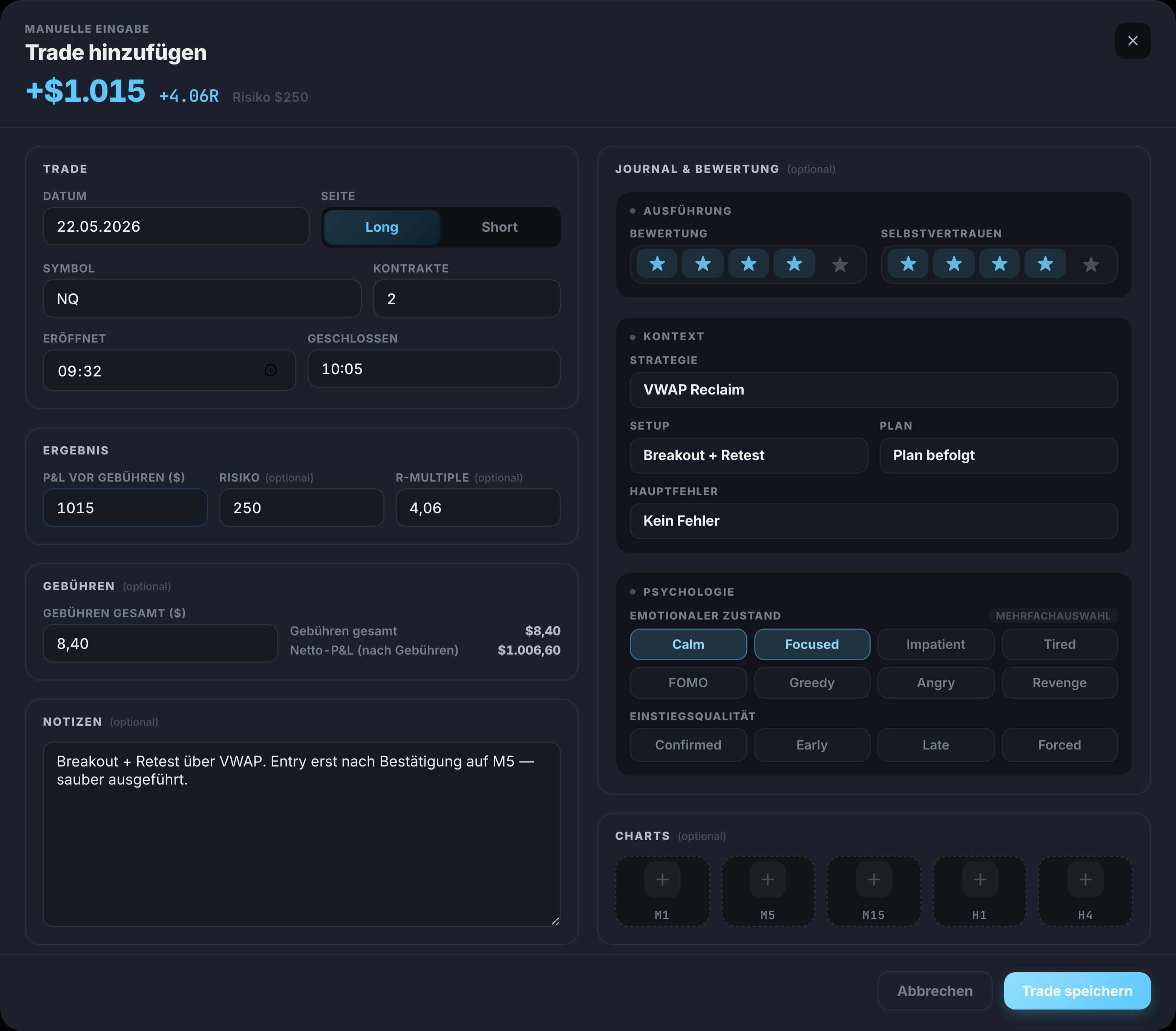
Ein Trade. In Sekunden erfasst.
Links die Zahlen, rechts der Kopf — ein Formular, ein kompletter Eintrag.
Dein Dashboard. Alles auf einen Blick.
Equity-Kurve, Trade-Kalender, letzte Trades, Trefferquote, Ø Trade und Erwartungswert — eine Seite, null Suchen.
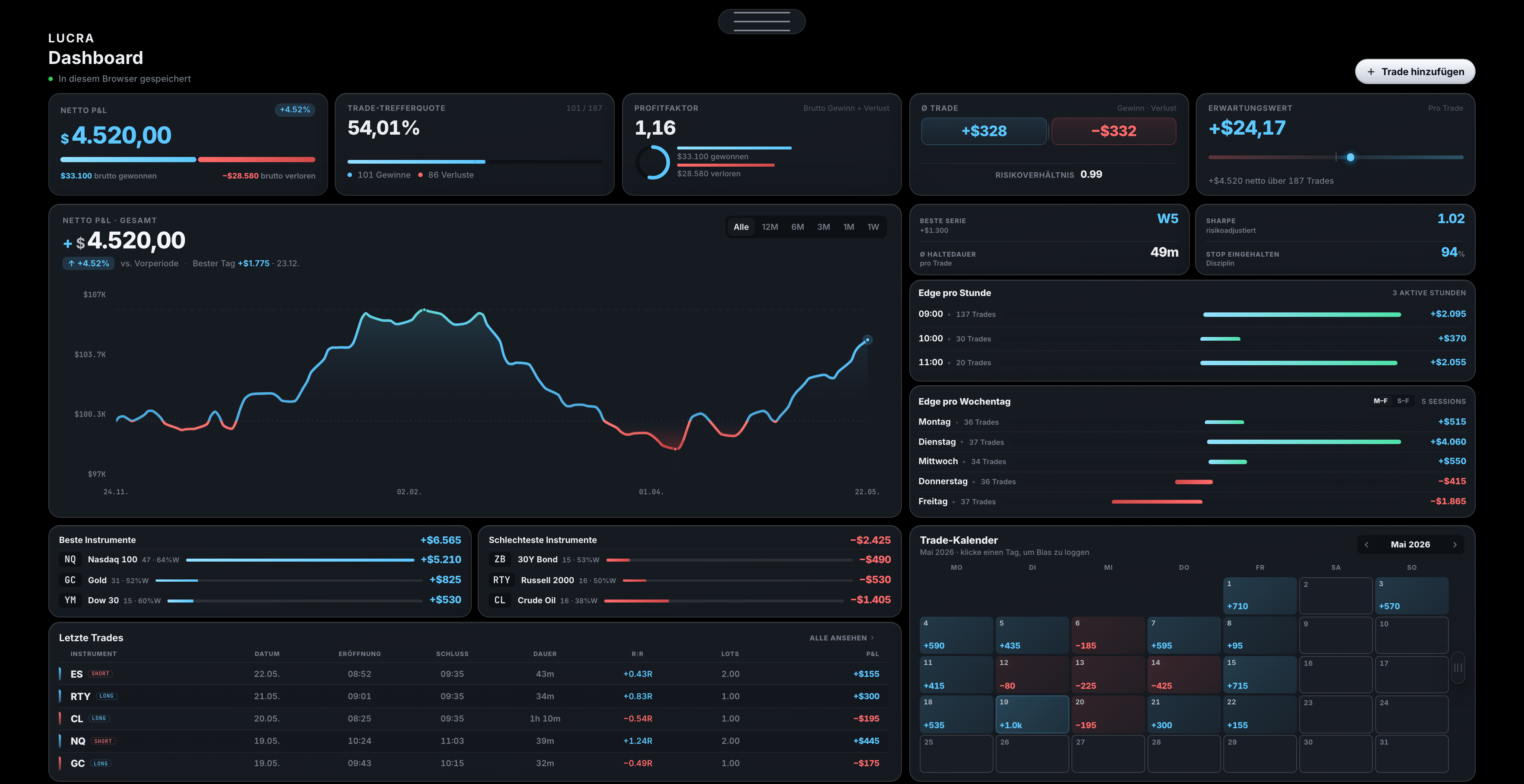
Deine Net-P&L-Kurve. Jeder Trade, netto — der echte Verlauf deines Kontos.
Dein Trade-Kalender. Jeder Handelstag grün oder rot — auf einen Blick.
Deine Kennzahlen. Netto-P&L, Trefferquote, Profitfaktor — immer oben im Blick.
Das Journal. Jeder Tag eine Karte.
Tages-P&L, Trades und Trefferquote auf der Karte — dahinter fünf Chart-Slots von M1 bis H4 und deine Session-Notizen. Zu jedem Trade: Strategie, Emotion, Einstiegsqualität. Screenshots landen per ⌘V im Tag.
Der ganze Handelstag, protokolliert. Fünf Chart-Slots (M1–H4) und deine Session-Notizen.
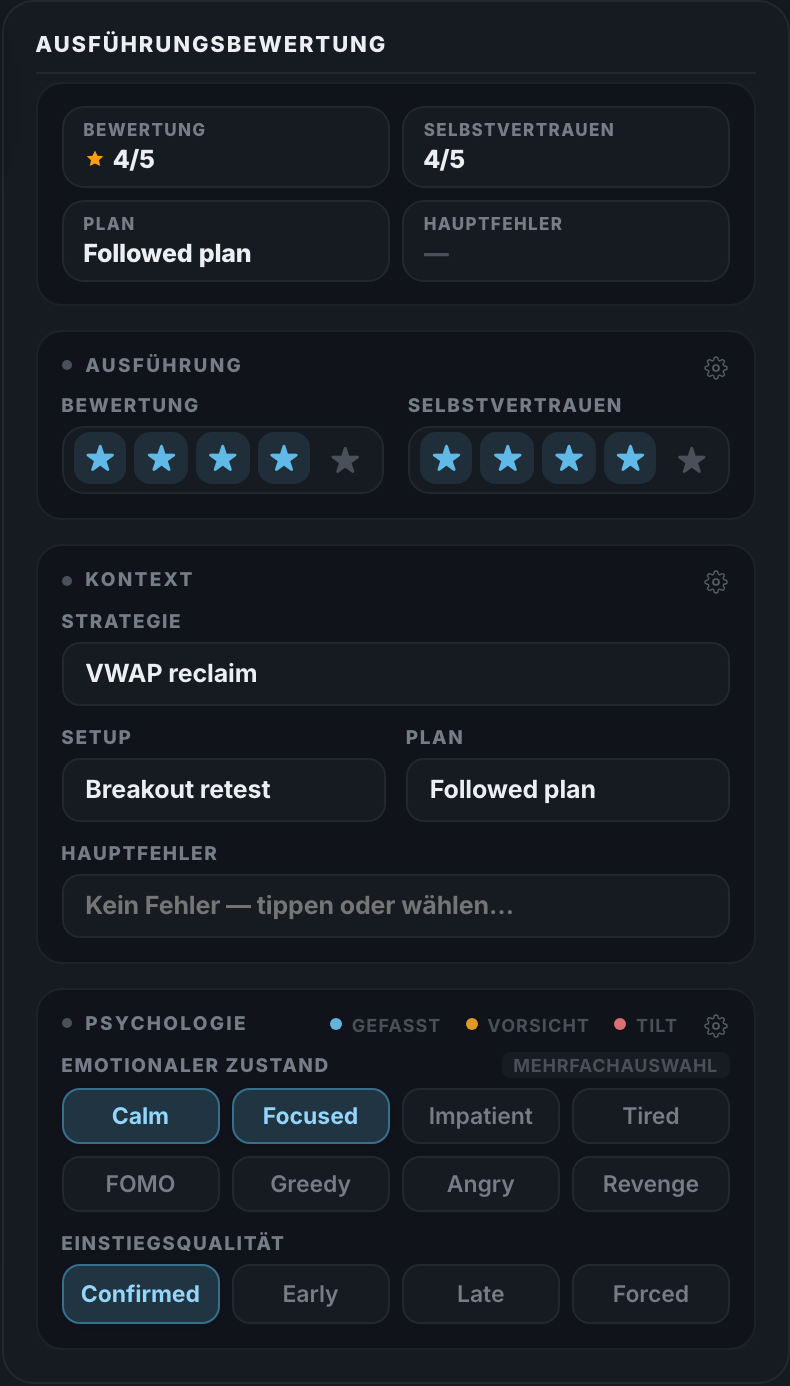
Jeder Trade, bewertet. Execution Rating, Emotional State und Psychologie.
Dein Dashboard. Alles auf einen Blick.
Equity-Kurve, Trade-Kalender, letzte Trades, Trefferquote, Ø Trade und Erwartungswert — eine Seite, null Suchen.
Das ganze Dashboard. Equity, Kalender, letzte Trades und Kennzahlen auf einer Seite.
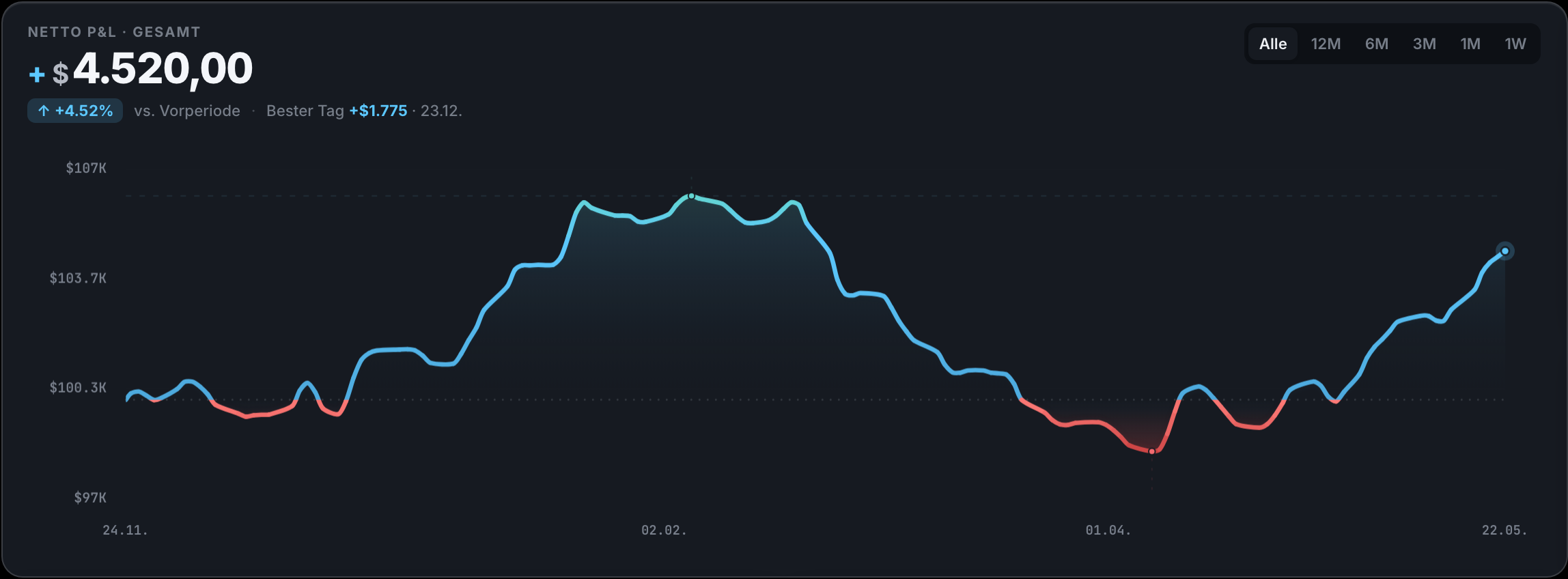
Deine Net-P&L-Kurve. Jeder Trade, netto — der echte Verlauf deines Kontos.
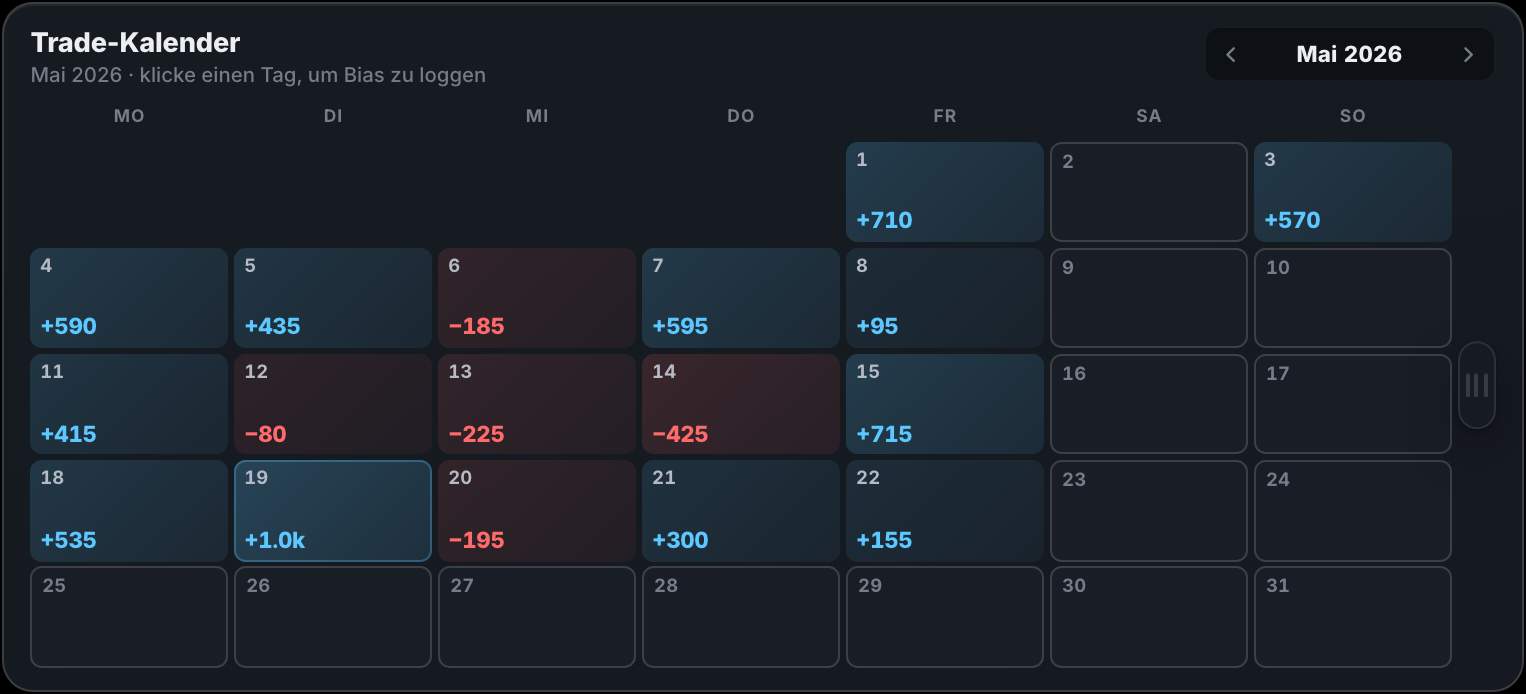
Dein Trade-Kalender. Jeder Handelstag grün oder rot — auf einen Blick.
Deine Daten gehören dir.
Deine Trades liegen lokal in deinem Browser — nicht auf fremden Servern. Cloud‑Sync ist optional. Und Löschen heißt löschen: Konto und Cloud‑Daten werden vollständig entfernt.
10 Tage kostenlos testenKeine Kreditkarte nötigMonatsabo jederzeit kündbar
Und außerdem.
Import
CSV-Import, Screenshots oder manuelle Eingabe — wie es zu deinem Broker passt.
Journal & Kalender
Notizen, Trade-Reviews und ein Kalender zu jedem Handelstag.
Mehrere Konten
Live, Funded, Demo — sauber getrennt, schnell gewechselt.
Drei Sprachen
Deutsch, Englisch und Spanisch — umschaltbar in den Einstellungen.
Schnell bedienbar
Keyboard-first: Trades erfassen und bewerten, ohne die Maus zu suchen.
Drei Darstellungen
Hell, Dunkel und Grau — für lange Sessions nach Börsenschluss.
LUCRA zeigt dir das Muster. Bevor du es wiederholst.
LUCRA Pro
15,99 €/Monat.
oder 159,90 €/Jahr — 2 Monate gratis · Best Value (≈ 13,33 €/Monat).
Ein Abo. Alle Funktionen. Keine Feature‑Sperren.
Inkl. aller Steuern — ≈ 3,99 € pro Woche. 10 Tage kostenlos testen.1 Monatsabo monatlich kündbar; Jahresabo 12 Monate Laufzeit.
10 Tage kostenlos testenKeine Kreditkarte nötigMonatsabo jederzeit kündbar
Fragen? Antworten.
Erste Schritte & Allgemeines
Was ist LUCRA?
LUCRA ist ein Trading-Journal: Du dokumentierst deine Trades, hängst Screenshots, Notizen und Bewertungen an und siehst in klaren Auswertungen, was wirklich funktioniert. Es läuft im Browser, ist local-first und synchronisiert optional in die Cloud.
Für wen ist LUCRA geeignet?
Für alle, die ihr Trading ernst nehmen — vom ersten eigenen Trade bis zum erfahrenen Profi. Besonders beliebt bei Prop-Firm-, Funded- und Challenge-Tradern, inklusive Regel-Checks wie Tagesverlust- und Risiko-Limits pro Trade.
Welche Märkte werden unterstützt?
Alle. LUCRA ist marktneutral — ob Forex, Futures, Indizes, Aktien oder Krypto: Du journalst jedes Instrument. Trades fügst du manuell hinzu oder importierst sie per CSV aus MetaTrader, NinjaTrader, Tradovate, ATAS, FX Replay und ähnlichen Tools.
Muss ich bereits Trader sein?
Nein. LUCRA ist ab dem ersten Trade nützlich — die Auswertungen helfen dir, Muster zu erkennen und besser zu werden, egal auf welchem Level du startest.
Eignet sich LUCRA für Prop-Firms und Funded-Challenges?
Ja. Viele Trader führen damit ihre FTMO-, Funded- oder Challenge-Konten — inklusive Regel-Checks wie Tagesverlust- und Risiko-Limits pro Trade.
Wie kommen meine Trades ins Journal?
Manuell in Sekunden — oder per CSV-Import aus MetaTrader, NinjaTrader, Tradovate, ATAS, FX Replay und ähnlichen Exporten.
Kann ich mehrere Konten führen (Live, Funded, Demo)?
Ja. Lege beliebig viele Konten an — Live, Funded oder Demo — sauber getrennt und mit einem Klick gewechselt. Jedes Konto hat seine eigene Auswertung.
Ist LUCRA Anlageberatung?
Nein. LUCRA dokumentiert und analysiert ausschließlich deine eigenen Trades. Es gibt keine Handelsempfehlungen — alle Auswertungen dienen deiner eigenen Reflexion.
Preis & Abonnement
Was kostet LUCRA Pro?
LUCRA Pro kostet 15,99 € pro Monat oder 159,90 € pro Jahr — jeweils inkl. aller Steuern (jährlich entspricht das ≈ 13,33 € pro Monat). Die monatliche Laufzeit ist monatlich kündbar; die jährliche läuft 12 Monate und verlängert sich danach jährlich, sofern du nicht vor der Verlängerung kündigst. Davor testest du 10 Tage kostenlos den vollen Funktionsumfang.
Brauche ich eine Kreditkarte, um zu testen?
Nein. Registrieren und 10 Tage den vollen Funktionsumfang testen — Zahlungsdaten gibst du erst an, wenn du danach weitermachen möchtest.
Kann ich jederzeit kündigen?
Ja. Die monatliche Laufzeit kannst du jederzeit zum Ende des Abrechnungsmonats kündigen. Die jährliche Laufzeit läuft zunächst 12 Monate und verlängert sich danach um jeweils ein weiteres Jahr, sofern du nicht vor der Verlängerung kündigst. Kündigen geht immer direkt in den Einstellungen — ohne Anruf, ohne Formular. Nach der Kündigung läuft dein Zugang bis zum Ende des bezahlten Zeitraums.
Was passiert mit meinen Daten, wenn ich kündige?
Dein Konto bleibt bestehen. Cloud-Daten werden nach Ende des Zugangs noch 10 Tage aufbewahrt und danach automatisch gelöscht; die lokalen Daten in deinem Browser bleiben unberührt. Konto und Cloud-Daten kannst du jederzeit auch sofort selbst löschen.
Wie wird meine Zahlung abgewickelt?
Sicher über Stripe. LUCRA speichert selbst keine Kartendaten — die Zahlung läuft vollständig über die geschützte Oberfläche von Stripe.
Kauf & Widerruf
Warum muss ich dem sofortigen Start von LUCRA Pro zustimmen?
LUCRA kann 10 Tage kostenlos getestet werden. Wenn du danach LUCRA Pro kaufst, wird dein Zugang sofort freigeschaltet — du musst also nicht erst bis zum Ablauf der Widerrufsfrist warten.
Die Zustimmung stellt sicher, dass diese sofortige Freischaltung rechtlich sauber dokumentiert ist.
Falls du nach dem Kauf widerrufst, zahlst du nicht pauschal den vollen Zeitraum, sondern nur anteilig für die bereits genutzte Pro-Zeit.
So bleibt das Modell fair: Du bekommst sofort Zugriff, und LUCRA schützt sich davor, dass kostenlose Testphase und Widerrufsfrist zu einer deutlich längeren kostenlosen Nutzung kombiniert werden.
Wie funktioniert die Widerrufsbelehrung?
Als Verbraucher in der EU hast du ein 14-tägiges Widerrufsrecht ab Vertragsschluss. Für den Widerruf genügt eine kurze, eindeutige Mitteilung (z. B. eine E-Mail). Alle Details und ein Muster-Formular findest du in der Widerrufsbelehrung.
Wie übe ich mein Widerrufsrecht aus?
Wenn du dein Widerrufsrecht ausüben möchtest, kontaktiere uns bitte innerhalb der gesetzlichen Frist über das Kontaktformular oder per E-Mail. Wir prüfen deinen Fall und bearbeiten den Widerruf entsprechend den gesetzlichen Vorgaben.
Was bedeutet anteiliger Wertersatz?
Wenn du dem sofortigen Start zustimmst und später innerhalb der Frist widerrufst, zahlst du nur für die Zeit, die du LUCRA Pro tatsächlich genutzt hast. Der Betrag wird anteilig aus dem Preis deines gewählten Tarifs (monatlich oder jährlich) und der bis zum Widerruf genutzten Dauer berechnet; den Rest erstatten wir. Die genaue Höhe hängt also von deinem gewählten Tarif und deinem Nutzungszeitraum ab.
Empfehlungsprogramm
Kann ich Freunde einladen?
Ja. Als Pro-Mitglied bekommst du einen persönlichen Einladungslink: Dein Freund erhält 10 % Rabatt im ersten Monat des Monatsabos (Jahresabos sind ausgeschlossen), und du erhältst 10 % Guthaben auf deine nächste Rechnung, sobald er zum ersten Mal zahlt.
Wie hoch ist die Belohnung?
Dein Freund erhält 10 % Rabatt im ersten Monat des Monatsabos, und du bekommst 10 % Guthaben auf deine nächste Rechnung — pro Person, die du erfolgreich wirbst. Der Empfehlungsrabatt gilt nur für Monatsabos; Jahresabos sind ausgeschlossen.
Wann wird eine Empfehlung gezählt?
Eine Empfehlung zählt, sobald die geworbene Person zum ersten Mal tatsächlich für das LUCRA-Pro-Monatsabo bezahlt — nicht schon während ihrer kostenlosen Testphase. Empfehlungsprämien gelten nur für Monatsabos.
Kann ich mehrere Personen einladen?
Ja. Du kannst deinen persönlichen Code an bis zu 10 Personen weitergeben — für jede erfolgreiche Empfehlung gibt es die Gutschrift.
Kompatibilität & Plattform
Auf welchen Geräten läuft LUCRA?
Überall, wo ein Browser ist: Desktop, Laptop, Tablet, Smartphone. Keine Installation, keine Updates — und mit Cloud-Sync ist jedes Gerät auf dem gleichen Stand.
Läuft LUCRA auf Windows und Mac?
Ja. LUCRA läuft in jedem modernen Browser — auf Windows, macOS und Linux. Es gibt nichts zu installieren und keine Updates: Du öffnest einfach die Seite.
Kann ich LUCRA mobil nutzen?
Ja. LUCRA ist für Smartphone und Tablet optimiert und läuft direkt im mobilen Browser — keine App nötig. Mit Cloud-Sync hast du auf jedem Gerät denselben Stand.
Daten & Sicherheit
Wo werden meine Daten gespeichert?
Zuerst lokal in deinem Browser (local-first). Mit einem Konto werden sie zusätzlich bei unserem Hosting-Dienstleister (Supabase) in der Cloud gespeichert, damit du geräteübergreifend zugreifen kannst. Ohne Konto verlässt nichts deinen Browser. Mehr dazu in der Datenschutzerklärung.
Wer hat Zugriff auf meine Daten?
Nur du. Deine Daten sind pro Konto isoliert, es gibt kein Werbe-Tracking und keine Werbung, und wir verkaufen keine Daten. Details findest du in unserer Datenschutzerklärung.
Lokale Speicherung oder Cloud-Sync — was ist der Unterschied?
Deine Trades liegen zuerst lokal in deinem Browser — auch ohne Konto nutzbar. Mit Anmeldung synchronisiert LUCRA sie in die Cloud, sodass du auf jedem Gerät denselben Stand hast. Die Cloud-Sync ist optional.
Wie lösche ich mein Konto?
Mit einem Klick: In den Einstellungen löschst du dein Konto samt aller Cloud-Daten selbst. Lokale Daten in deinem Browser bleiben davon unberührt und kannst du dort jederzeit ebenfalls entfernen.